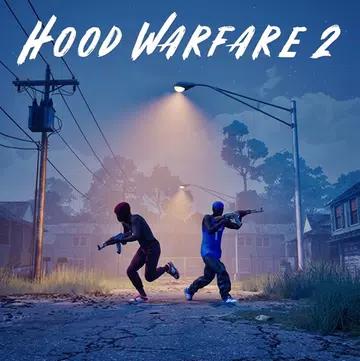
Rival gangs fight for control of Chicago. Choose your gang, customize your weapons, and compete against other players in action-packed game modes. Conquer territories, defend your streets, and prove your skill in this chaotic multiplayer FPS.
Hood Warfare 2 recaptures the thrilling shooting gameplay and humor of the original, now powered by Unreal Engine 5. It features enhanced graphics, new weapon animations, and a diverse selection of maps. Fight in the heart of Chicago, the suburbs, the trenches, and the city's shopping mall. Learn different routes and strategic positions on each map as you face enemies both outdoors and indoors.
Features of Hood Warfare 2 APK
Weapon Customization
Customize your weapons with various sights, magazines, grips, silencers, and other attachments. Build your favorite weapon configuration and equip your squad with the right perks and gear before starting a match.
Unlock Weapons and Gear
Play matches, gain experience, and unlock more weapons and gear by leveling up. Complete weapon challenges to earn attachments and unlock new skins by getting kills with different weapons, allowing you to customize your weapon.
Online Multiplayer and Bot Matches
Play online with friends or compete against other players. You can also create private matches against bots by selecting your preferred map, game mode, and settings. Add bots to form teams and start your matches.
Six Different Game Modes
- Torture War: Fight against rival gangs to capture and control territory on the map. Score points by conquering different areas and driving the opposing team out of their territory.
- Gangbang: Join a classic team shootout where two gangs fight to get the most kills. The team with the most eliminations wins.
- Chaos: Play in a free-for-all mode where each player fights for themselves. There are no alliances between gangs, and the player with the most kills wins.
- Loot: Steal the enemy team's bag and take it safely back to your territory. Protect your team's bag while they try to capture the other team's.
- Blockade: One gang must plant a bomb while the other team tries to stop or defuse it. Each player has only one life per round, so survival is crucial.
- Chain Grab: Collect the chains dropped by eliminated opponents and score points. You can also collect your teammates' chains before the enemy gang steals them.
What's New?
- Character Customization: Customize your character in the game menu. Unlocked characters are now available in packs, including their original body and clothing. You can keep all your unlocked items and mix and match clothing from different packs. More clothing options are planned for future updates.
- Matchmaking and Groups: The matchmaking system has been revamped, and the group system has been improved. Group members are now automatically assigned to the same team upon joining a match.
- Map Voting: A new map voting feature allows players to vote for their favorite map between matches.
- Map and Mode Previews: Each map and game mode combination now includes its own preview image, showing how the corresponding mode will look on the selected map.
- UI Improvements: Several menus have been redesigned, including a clearer player level indicator and an improved, scrollable groups section in the main menu.
- Killstreak Indicator: The killstreak indicator has been enlarged, and a yellow highlight now indicates when a killstreak is available.
- Controller Improvements: Controller responsiveness, aim assist, and dead zones have been optimized. Button mappings for Xbox and PS5 have also been added, along with expanded settings for customizing personal preferences.
- Camera Settings: Lobby creators can now restrict matches to first-person or third-person view. Official servers support both views, except for "Destroy The Block," which is now playable only in first-person.
- Spawn Point Improvements: The spawn system has been adjusted for better player positioning. While smaller maps like "Supermarket" can still be tricky, the spawn point should be improved overall. More maps are planned.
- Spawn Point in "Destroy The Block": Spawn points are now located in a straight line at the back of the map, instead of being scattered across multiple locations.
- Team Spectator: Players can now see their teammates during a "Destroy the Block" match.
- Player Stats: A new stats section has been added. Players can view their stats by clicking their name in the top right corner of the main menu.
- Sticky Fingers: A new ability allows players to collect ammo from eliminated opponents.
- Wall Checking with Weapons: The distance at which nearby walls prevent firing has been reduced. Firing now automatically resumes as soon as players move away from an obstacle, without needing to click.
- Shotgun Reload: Shotgun reloads can now be canceled, allowing players to interrupt the process.
- Team Navigation: The ESC key can now be used to navigate the team menu.
- Intro Volume: The UI volume slider now also controls the volume of the startup logo.
- Chat Filters: The restrictions on chat filters based on regular expressions have been reduced.
- Weapon Swap: Fixed a bug that allowed players to instantly switch weapons and fire.
- Sniper Rifle Shoulder Swap: Fixed a shoulder swapping issue when using sniper rifles.
- Ammo Bug: Fixed a bug that allowed players to repeatedly pick up their weapon and obtain unlimited ammo.
- Grenades: Fixed several grenade issues, such as grenades disappearing after being thrown, becoming invisible, or getting stuck in the player's hand.
- Windows on the Suburban Map: Fixed several window issues on the Suburban map.
- Mall Boundary: Fixed a bug that allowed players to leave the Mall map during a killstreak from a vehicle.
- General improvements: Several bugs and glitches have been fixed to improve the gameplay experience.
How to get the latest update
If the update doesn't appear on Steam, restart Steam completely. To do this, open the Steam menu in the top left corner, select "Exit," and restart Steam. A pending update should appear. Once the update is complete, check the bottom right corner of the game window to see if version 1.0.2.2 is displayed.
The developers would also like to thank all the members of the Discord beta test channel who helped test this update. Future updates are expected to bring more maps and content to the game.